3 min to read
Reflection Journal#12: User Agent with Flask
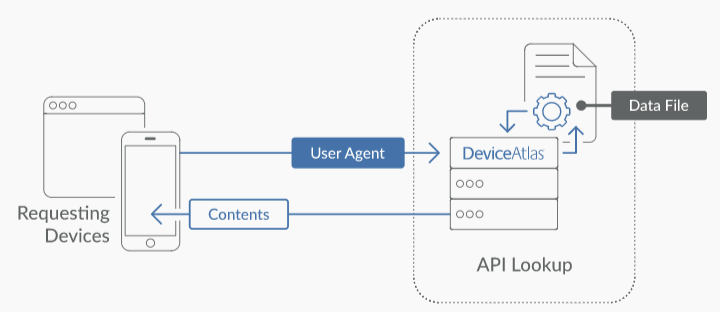
What is User-Agent?
User-Agent is a software agent that allow us to know client’s details such as operation system, IP address, or platform (mobile/desktop) and browser’s name (chrome, firefox).
Why do we need it?
User Agent seems to be pointless but if we try to think a litle deeper, there are many useful ways we can do with user agent.
We have the ability to load different CSS files based on the capabilities of the browser or devices and also send out suitable JavaScript files. In this way we can send an entirely differene CSS layout to a phone compared to desktop computer. Therefore can improve or optimize the overall performance of the website. Imagine a phone has to load all CSS or JS that used in a desktop version, for a mobile device, it would take ages to complete.
Another thing is we can send the correct translation text based on user agent language perference.
What else? What about statistics? We can see our visitors information including where they are and how our website attracts to a particular group of people. This is also useful when it comes to security risk where we have to manage use last login device so we can track their proccess and alert them when there is a new device sign in.
Here is the example of how user agent might look like from header:
Mozilla/5.0 (Linux; Android 5.1.1; Nexus 5 Build/LMY48B; wv) AppleWebKit/537.36 (KHTML, like Gecko) Version/4.0 Chrome/43.0.2357.65 Mobile Safari/537.3
How can we retrieve it with Flask?
Normally, we can extract the information from header in incoming HTTP requests. However, to make this incredibly easy, in my template, I covered the issues in a simple format. This can be defined as follow:
First you will need to import the class that is responsible for HTTP request
from app.framework.requests.request import request
Then, you can retrieve the information like this:
# get language preferences
request.locale()

# get platform (mobile, desktop, etc)
request.platform()

# get browser version
request.version()

# get browser names
request.browser()

# get IP (IPv4, IPv6)
request.ip()

# get IP address location (default to country name)
request.location()
You can also chain it to IP class
# using properties
request.IP().city
request.IP().country
request.IP().state
request.IP().region
request.IP().country_code
request.IP().address

# using method
request.IP().get_country_name_by_ip()
request.IP().get_city_name_by_ip()
request.IP().get_region_name_by_ip()
#... etc
User agent is a string that is sent along with the request in the header. If you would like to retrieve it in other way, my request class also includes the retrieval of header by using
request.header()
If you would like to retrieve specific header properties, you can also define it
request.header("X-Client-IP")



Comments