4 min to read
Networking #1: TCP/IP model
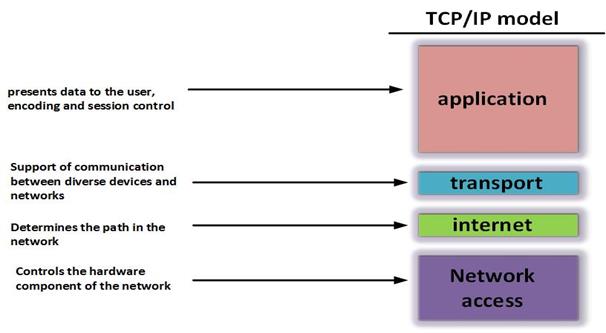
We’re living in an age of technology where the Internet indispensable. I bet you can’t live one day without going online. But do you actually understand how the Internet works? TCP/IP is commonly used as a transmission method nowadays. But what exactly is TCP/IP? What is the function of each layer in this model?
TCP/IP Model
TCP / IP stands for Transmission Control Protocol / Internet Protocol, it is a collection of protocol that used to exchange information and connect devices on the internet. More specifically, TCP/IP shows us how to pack information (also known as packets), sent, and received by connected computers.
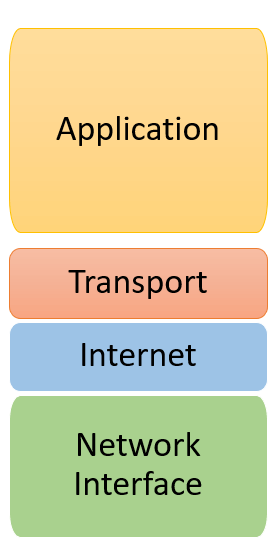
The standard TCP / IP model consists of 4 layers:
1st layer: Network Access 2nd layer: Internet layer 3rd layer: Transport layer 4th layer: Application layer
Layers in TCP/IP Model
Application
- It creates communication between users.
- It allows users to exchange information through various network services such as web browsing, chatting, emailing, etc.
- The data will be formatted as end-to-end byte, along with routing information such as address to help determine where the data is to be sent
Some data exchange protocols
- FTP (File Transfer Protocol): A protocol based on TCP that enables two-way transfer of ASCII or binary files.
- TFTP (Trival File Transfer Protocol): file transfer protocol. It is mostly used to transfer files from one host to another.
- SMTP (Simple Mail Transfer Protocol): the protocol used to distribute email.
- Telnet: allow remote access to configure devices.
- SNMP (Simple Network Managerment Protocol): An application allowing management and monitoring of network devices remotely.
- Domain Name System (DNS): A domain name resolution protocol used in Internet access support.
Transport
Responsible for maintaining end-to-end communications throughout the network. This layer has 2 main protocols: TCP (Transmission Control Protocol) and UDP (User Datagram Protocol)
TCP will ensure the quality of packet transmission, it will make sure that the packet arrives at the destination without any errors or else it will be retransmitted. However, it takes a long time to fully check information from the data and control network congestion.
Contrary to TCP, UDP has a faster transfer speed but does not guarantee the quality of data sent (it does not care whether the data reaches the destination or not).
Internet
This layer handle the process of packet transmission on the network. In other words, its task is to deliver packets from source to destination based on IP addresses in packet headers.
In order to achieve this, it needs to find the destination to send the data from the source (also known as routing), Then forward the packet from the source to the destination. After it receives data from the above protocol, adds a header containing the information of the network layer and continues to move to the next layer.
Network Access
It is a combination of Data Link layer and Physical Layer in OSI model (this model is similar to TCP/IP). Network Access is the lowest layer in TCP/IP model. It is responsible for data transmission between devices in the same network. Here, the data packets are framed and routed to the specified destination.
How it works.

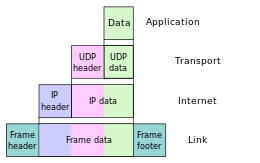
When transmitting data, the process proceeds from the top layer to the bottom, through each layer, the data is added to the control information called Header. When the data is received, the process is reversed, the data is transmitted from the bottom to top and through each layer, the corresponding header will be removed and when it reaches the top layer, the data is no longer header.
-
The IP plays an important role, it allows packets to be sent to a designated destination, by adding navigation information (The header) to the packets, in that way, the packet is able to reach its destination.
-
The TCP protocol plays a role of checking and ensuring the quality of each packet when passing through each layer. During this process, if the TCP protocol detects that a packet is corrupted, a signal is transmistted and requires the system to resend another packet.
Advantages
It is an open source suite. It is not owned by any particular organization which means it can be used by any individual => we are free to use.
Highly scalable, routable. By assigning an IP address to each computer on the network, it makes devices easier to be identified and be able to determine the most efficient path to transmit data.
Highly compatible with all operating systems, computer hardware and networks. It works effectively with many different systems.


Comments