4 min to read
Memoization - Improve code performance
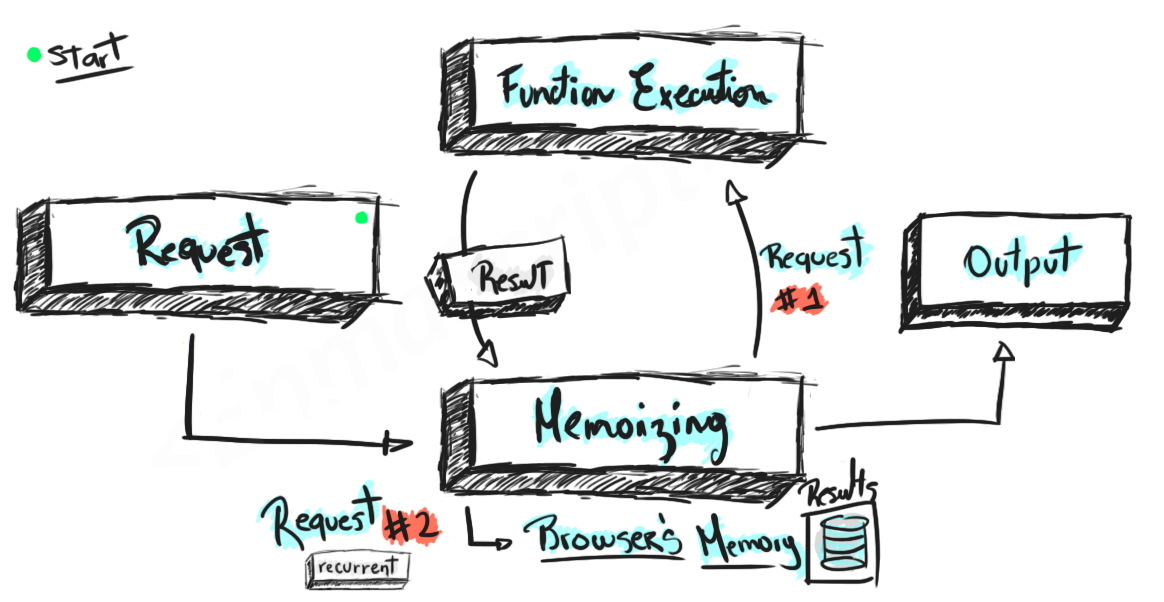
Have you ever heard of the term Memcached or Memoization before? If you have, then have you used it in your projects? And if you have no idea what it is, hopefully this article will provide you with some helpful explanation. I will also look into real case examples.
Sometimes when you build the project, have you ever noticed that somewhere in your code runs really slow, even though the data already exists. Or you may even heard from someone complaining the same thing! Given example of user account, once the data has been taken by the user from the database, we should not retrieve it again. Unless the data is updated, else just let the user use the cached data.
Usually, the people who work in software development industry can understand the term Memoization, but front-end developers most likely do not understand how it works. In short, Memoization is an optimization technique that used to speed up computer programs by storing information in cache, it will return the cached results when the same computation is needed.
Example
This technique is not part of any programming language, which means you can use in in any language you prefer. In my example, I will use JavaScript because it’s easy to execute and can perform quick tests. First, we will need a function that does something. Let’s say a function to compute fibonacci number.
function fib(n)
{
    if (n < 2)
        return 1;
    else
      return n * fib(n - 1);
}
Then we would need to test how fast it is executing.
function fib(n)
{
    if (n < 2)
        return 1;
    else
      return n * fib(n - 1);
}

console.time('Run first time');
fib(30);
console.timeEnd('Run first time');

console.time('Run second time');
fib(30);
console.timeEnd('Run second time');

//Run first time: 17.636962890625ms
//Run second time: 15.080078125ms
Depend on your PC, you might have different number. But let’s take a closer approach, there is a clear evidence that we call the fibonacci function 2 times, with the same number, even when two results are the same, we still need to wait for another 15ms to get the same result. And this is when Memoization comes to play. Hopefully by now, you get how Memoization is important. Let’s modify the code a little bit.
Memoization function
Here is how your memoization function should look like:
function memoization(func){
    const cache = new Map();

    return (...args) => {
        const key = args.join('-');

        if(!cache.has(key)){
            cache.set(key, func(args))
        }
        return cache.get(key);
    }
}
And then let’s use this function
const memo = memoization(fib);
console.time('Run first time');
memo(30);
console.timeEnd('Run first time');

console.time('Run second time');
memo(30);
console.timeEnd('Run second time');

console.time('Run third time');
memo(30);
console.timeEnd('Run third time');

//Run first time: 13.579ms
//Run second time: 0.013ms
//Run third time: 0.005ms
If you look at the result, the first time return the same execution time. But for the second time, it is much faster compared to the first one. Through this technique, you can clearly see that there is a huge performance improvement, and that’s why some website loads really fast but some go really slow.



Comments