12 min to read
About JavaScript #2

If you haven’t read previous post, you should read it before continuing reading this article. Similar to the previous article, it is going to cover some JavaScript features that make JavaScript unique.
Falsey value
Actually this part has nothing to do with coercion, but it has a lot to do with JavaScript being a loosely typed language. What is loosely typed language? you can google it, but simply we do not necessarily assign a type to a variable when it initializes, but the language will automatically assign a type to it when you assign it a value. And sometimes we can use it as a different type. For example
if ("alice") {
    console.log('hello world'); // output: hello world
}
The above example will return hello world as the result, but thing is, the word alice has nothing to do with condition in order for the if statement to be executed, but it did execute. This is because the JavaScript itself has falsey and truthy value. Some of the falsey values are:
- undefined
- null
- 0
- empty string
" " - NaN
And the rest are truthy values, for example things can look like this:
if ([]) {
    console.log("Hello world!"); // hello world
}

if ("") {
    console.log("Hello human");
}
DOM
What is DOM? Document Object Model (DOM) is an application programming interface (API) for HTML and XML document. Simply, it is a way to communicate between HTML and JavaScript. The DOM is built as an object tree as follows

This object tree has a root called document
Why do you need DOM, why doesn’t JavaScript work directly with HTML? Let’s say there are two guys and they speak different languages, which means it is impossible for them to work directly together. In addition, the HTML is just a Markup, while JavaScript is the code, they are not even the same, so there needs to be someone to stand in the middle to support these 2 guys, and that is the DOM. For example, if you have a html tag <div> hello world</div>, the browser will create an object for this element, therefore allow JavaScript to work with it.
How does it work? The process looks as follow:
- When you load a page, your browser does 2 jobs. Parse code HTML and render it to the user. The second job is it creates a list of objects that represents for Markup HTML, these objects will be saved to the DOM
- The JavaScript interacts the DOM to have access to HTML elements and its values
- After JavaScript modifies the DOM, the browser updates the page and renders it again.
What happen if you try to access non-existing HTML elements? For example: document.getElementById('whateverid') will return null. Keep in mind, null not undefined
Lexical Scope
If you’re looking for the explantion of scope, please refer to this post. I believe that when you read articles about JavaScript, sometimes, you encounter this issue: lexical scope. If you want to understand this concept, you need to look at how JavaScript compiles and transpile the code

When compile code, JavaScript engine will go through 3 stages
- Tokenizing/ Lexing: Extract string to tokens. For example
var a = 1;will becomevar,a,=,1,;. - Parsing: convert tokens into an AST (Abstract Syntax Tree) representing the semantic structure of the program. For example, if you are given the set of tokens above, I can build a tree with a root node of
VariableDeclaration, it will have 2 child nodes,Identifierwith a value ofaandAssignmentExpression, this node has a child node calledNumericLiteralwith a value of 1. - Code-generation: Convert from AST to execuatable code. The statement
var a = 1;will be converted into sets of machine instructions: create a variable calleda, assign it a value of1and saved to memory.
Now the JavaScript’s compiler is different from other languages compilers. Rather than having 3 steps as stated above, it has another extra step. But let’s keep it simple as it is for now. So far, we get a little understanding about the compiler and its steps, looking at the first step, lexical scope, lexing. The lexical scope is the scope that is decided at the lexing stage when you compile but not execute. And to make it easier to understand, lexical scope, lexical scope is a scope that you can see its scope by just looking at it. let’s look at some examples:
var a = 2;
function print() {
    console.log(a); // 2
    var b = 100;
}
print();
console.log(b); //ReferenceError: b is not defined
Now, how do you know that there will be errors even when you haven’t run it. Look at it closely, just look, it doesn’t matter how you run the code, as long as you write it like that, look at it like that and the scope will be revealed. For example, looking at the above code, var a = 2; is in global scope, therefore you can use it anywhere. But looking at the variable b, it is in the function print, also known local variable and then we intend to use it in the outer scope. Therefore, result in errors.
function foo() {
    var a = 2;
    console.log(a);
}

function bar() {
    var a = 3;
    foo();
}

var a = 'Hello world';
bar();
The code will print 2 and if we try to remove the statement var a = 2; in the foo function, the result will be hello world.
Hoisting
Before explaning the concept of hoisting, let’s examine the given block of code
What is the result?
console.log(a);
var a = 100;
How long have you been working with JavaScript, if you have been working with it over 1 year and the answer is 100, I think you should RUN it now. Actually the answer for this question is undefined. Why is undefined? If you have read my previous post, in what situation you think this question return undefined. In the first cases, the variable a has been declared but has not been assigned a value yet, so it holds the value undefined. Well but I just declared it later, why isn’t that work?
In JavaScript, there is a concept of hoisting. As long as we declare the variable, it will be used anywhere in the lexical scope. Obviously, we have just declared var a = 100; right after console.log(a);. You need to declare it on top of every scope because this is how JavaScript interprets the code. Beside the potential effects of creating more bugs, it is not useful at all. In ES6, if you declare with let or const, hoisting is no longer used.
console.log(a); //ReferenceError
let a = 'hello world'; // the same with const
Function scope vs block scope
I think I have explained about this in some of my previous posts but let’s keep it simple. Scope in JavaScript is function scope. When you declare a variable inside a function, its scope will be inside that function. But with ES6, there is another scope which is block scope. Any variables that are declared within { }, its scope will be inside that curly braces. And it will be good when using in if, for, while.
function run() {
    if (100 > 20) {
        var m = 100;
        console.log(m, "meters !!");
    }
    console.log("you ran ", m, "meters");
}
run();  //100meters !!
Here the keyword var is a function scope, so if we move m outside if block, the code will still run perfectly fine. What ES6 comes up with is a way to prevent this from happening by using let or const
function run() {
    if (100 > 20) {
        let m = 100;
        console.log(m, "meters !!");
    }
    console.log("you ran ", m, "meters");
    //Reference error: m is not defined
}
run();
Variable hoisting vs function hoisting
As previously mentioned about variable hoisting, let’s look at function hoisting by examining the following code:
print("hello world");

function print(input){
    console.log(input);
}
The question is, does the above code produce errors?. NO, remember hoisting, hoisting and hoisting. The result is not undefined either, but it looks like the JavaScript compiler just reverses the runtime function and declaration.
You know hoisting, when the browser loads the page, the JavaScript code will get executed from top to bottom. Now where are the errors? As clear as you can see, you can still use a function even when you haven’t declared it. The JavaScript code gets compiled first before running. Therefore the JavaScript engine will be able to read all function declarations. That’s why it doesn’t matter where you declare the functions
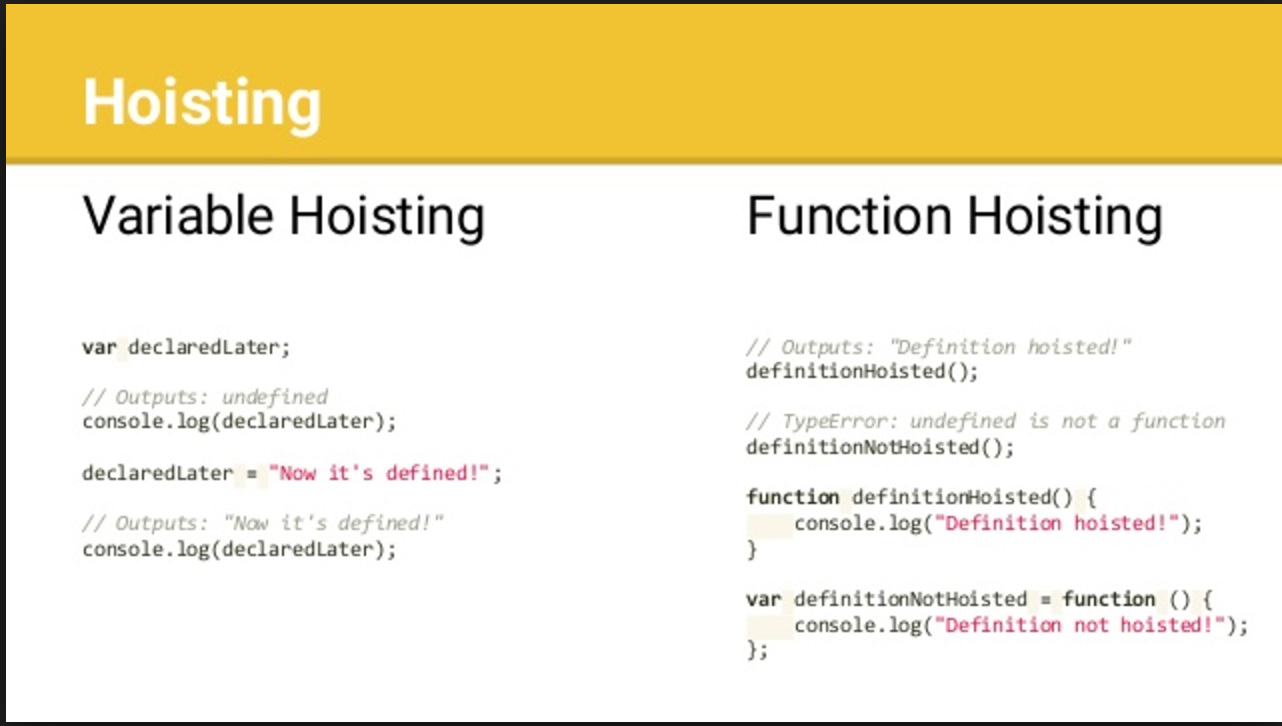
Now what about this
print("hello world");

var print = function(input){
    console.log(input);
}
=> print is not a function

Hoisting function only works with Function declaration, not with Function expression. For further reasons, please read the next section. The difference between Function Declaration and Function Expression is the reason behind the above Error.
Function declaration vs function expression
They work the same and easy to identify. For function declarations, it always started with the keyword function
function myFunction(){
    console.log("Hello world!");
}
But with function expressions, you assign with through the assingment operation
var myFunction  = function() {
    console.log("Hello world!");
}
myFunction(); // hello world
Apart from the syntax, there is one more thing that makes a difference of a Function declaration and a Function expression. As I mentioned before, JavaScript before execute code, it will compile the code first. In this compile step, when the compiler encounters a Function declaration, it compiles the entire function and assigns the function reference to function_name (eg myFunction). In other words, right from the compile step, the JavaScript engine knows where this function is, what the content is. Which leads to when executing code, you can use it anywhere in the lexical scope. But when the Function declaration is different, it will … do nothing. That’s right, with var myFunction = function () {...}; the only thing the compiler does is say myFunction and assign it a value of undefined, regardless of the Function expression. Until the JavaScript engine execute code, myFunction is assigned a reference to the Function expression, which we can use later. This leads to hoisting that does not exist with the Function expression.



Comments